
Welcome to SWU: Life Counter APP
The SWU: Life Counter APP is a comprehensive ecosystem designed for Star Wars: Unlimited players. It combines a powerful Android application with a real-time web-based synchronization system, allowing you to track your games and broadcast them with professional overlays effortlessly.
Mobile Tracking
Intuitive interface for life, resources, and tokens on any Android device.
Instant Sync
Your game state is updated in milliseconds across all connected displays.
Streaming Ready
Professional PHP-based overlays ready to be dropped into OBS or vMix.
Mobile Application Setup
Get started by downloading the app and configuring your first match.
1. Player Selection
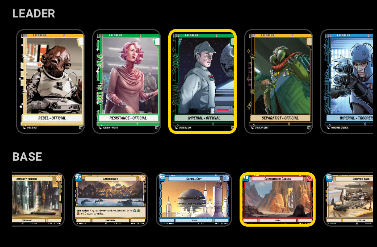
For each player, select their Leader and Base. In Twin Suns mode, each player must select two Leaders as per the game rules.
2. Starting a Match
- Quick Start: Start a local-only match. Useful for casual play without a stream.
- Start Game: Generates a unique Game ID and begins real-time synchronization with the server.

Get the App
Track your games anywhere. Available on Google Play.

Game Modes
The app natively supports both official formats:
Premier / Sealed (1v1)
The standard way to play. Tracks base health and all standard tokens.
Twin Suns (3-4 Players)
Designed for multiplayer chaos. Supports multiple leaders and the specific Blast and Plan tokens.
Controls & Tracking
Interact with the interface using simple taps. The UI is designed to feel like an electronic scoreboard from the Star Wars universe.
Tracking Health
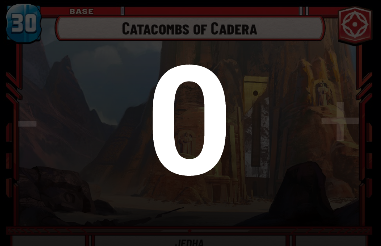
Tap the large damage numbers to increase or decrease health. Long-press for faster adjustments.
Leaders & Bases
Track Epic Actions and status effects. Use a Leader from the LAW (Lightsaber and War) collection for a premium experience.
 ← Example: Collection LAW
Managing Tokens
The following tokens can be toggled to represent the current game state:

Initiative
Mark the player who holds the initiative for the current round.
Epic Action
To activate: Tap the Leader's Portrait directly. The Epic Action token will light up to indicate it has been used this phase.
Credits / Resources
Keep track of available resources or bounty rewards earned during the match.

Twin Suns Tokens
Specific trackers for Blast and Plan effects in multiplayer games.
The Force
Toggle the Force for your leader. When active, it pulses with a blue glow, indicating special abilities are available.
Victory Points
Track your wins in a best-of-three match. Tapping the circles fills them with a vibrant orange glow.
Common Functions
Manage your game state with these utility buttons found at the bottom of the screen.
Reset Table
Restores all life, tokens, and resources to their starting values for a new match.
Activity Log
View a detailed history of all changes made during the game, synchronized in real-time.

Real-Time Syncing
When you start a game with sync enabled, the app communicates with the central hub using a Game ID.
Pro Tip: You can find your Game ID at the top of the mobile screen. Share this ID with your production team or enter it into the Overlay configuration.
Personal Area (Player Account)
The Personal Area is a comprehensive section designed for competitive players. It allows you to manage your personal Star Wars: Unlimited collection, track your completion progress in real-time, and export data for the main ecosystem platforms.
Cloud-First Sync
Log in using your Google account to sync your collection across all your devices. Our Local-First architecture ensures that even without an internet connection, your collection is accessible and updates are queued for background synchronization.
Dynamic Stats
Track your completion percentage for every released collection. The app calculates your progress dynamically based on unique cards owned in each Set.
Collection Management
Manage your cards with detailed variant support. Added cards are immediately backed up to our secure servers.
Variant & Stock Management
Our system supports the most comprehensive list of variants (Normal, Foil, Hyperspace, etc.). You can now perform a Full Clear of your collection via the Settings menu if you need to start fresh or resolve sync issues.
Power User Tools
OCR Scanner 2.0
Identify cards instantly via camera. Use the "Scan Next" button for rapid-fire additions to your collection without leaving the camera view.
LigaStarWars Integration
Export your collection in the official 14-column format for ligastarwars.com.br. The app automatically maps all variants to the "Extras" column for perfect compatibility.
Advanced Data Export
Download your data in CSV or JSON formats with granular filters. Perfect for backup or external analysis.
How to Use: Card Recon (Scanner)
For the best recognition results, follow these professional tips:
- Title is Key: Our OCR engine primarily uses the card title for identification. Ensure the top area of the card is perfectly clear.
- Manual Zoom: Use the on-screen zoom slider or pinch-to-zoom to bring the card title into sharp focus. A larger, clearer title means faster recognition.
- Distance Matters: Don't get too close. Stay at a distance that allows the camera to auto-focus, then use the digital zoom to fill the frame with the card.
- Avoid Glare: Tilting the card slightly can help avoid reflections from sleeves or high-gloss finishes.
How to Use: App Settings
Manage your account and local data through the Settings view:
- Clear Collections: Found at the bottom of Settings. Use this to remove specific sets from your local database and remote account. Warning: This action is irreversible.
- Nickname: Update how your name appears in the header and on shared data.
- Active Sets: Choose which collections are visible in the app to reduce clutter.
Streaming Overlays
Our overlays are web pages that read the live data from your mobile app.
Premier Overlay
Optimized for 1v1 broadcasts. Sleek, minimal and clear.
live/overlay.php?id=YOUR_ID
Twin Suns Overlay
Designed for 3 or 4-player wide layouts.
live/overlay.php?id=YOUR_ID
OBS Integration
- Open OBS Studio and add a new Browser Source to your scene.
- Paste the URL of your chosen overlay (e.g.,
https://swulifecounter.swdbr.com.br/live/overlay.php?id=12345). - Set the width to 1920 and height to 1080.
- Ensure "Refresh browser when scene becomes active" is checked.
Ecosystem Roadmap
We are constantly evolving the SWU: Life Counter experience. Here is what's coming next:
Match History
Review your past performances, win rates with specific leaders, and detailed activity logs for every game.
Custom Lists
Create and manage personalized lists beyond your collection, such as Want Lists, Sell Lists, and pre-deck inventories.